Changing values
Double-click a value to edit it, and press Enter to write it through gdb. This works in three places: the Variables pane, the Registers pane, and the hex column of the memory viewer.
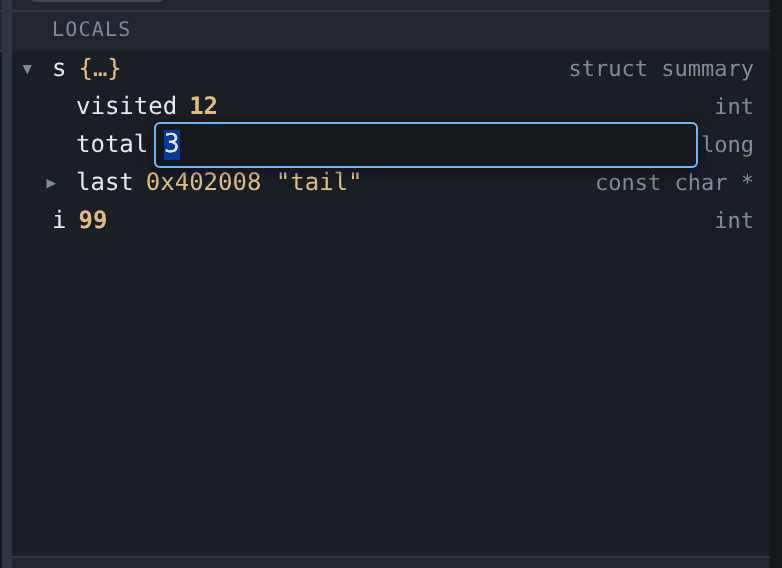
Press Escape, or click elsewhere, to leave the value alone.
If gdb refuses what you typed, the box stays open with the text still in it and turns red, and the reason appears in the status bar. Nothing has been written, and the correction is made where the mistake was rather than retyped.
What you can type
The box takes a gdb expression, not just a number. All of these are things you can type into a variable’s value:
42
0x2a
'A'
count + 1
&head
gdb evaluates the expression in the frame the row belongs to, so count + 1 means the count you are looking at.
The value shown afterwards is read back from the program, not echoed from what you typed. Assigning 321 to a char shows 65 'A', because that is what landed.
Registers
Editing a register works the same way, and the same expressions apply — $pc takes main or 0x401136 as readily as a number.
The value is read back in whatever format the pane is displaying, so typing 42 into a register shown in hex gives 0x2a.
Two kinds of register are not editable, and are not offered:
- Vector and floating-point registers that gdb prints as
{v4_float = {…}}. That is several readings of the same bytes rather than one value, so there is nothing to type over. - Registers gdb has not named. gdb’s numbering has gaps; a write goes out as
$name = …and there is no name to use.
Memory
Each byte in the hex column is edited on its own, in hex, two digits. A 0x prefix is accepted, since that is how the addresses beside it are written.
Bytes shown as ?? are not editable: they were never read, so there is nothing to change and nowhere to put it.
What is not editable
Arrays, structs and unions are not. gdb refuses to assign to them, so the row does not offer an edit rather than offering one that always fails. Scalars and pointers are editable — redirecting a pointer is usually the most useful thing to do in that tree.
Whether a row can be edited is gdb’s answer, not a guess from the type name: the row is marked when the pointer is over it, and left alone otherwise.
Everything else sees the change
A write is announced to every connected browser, so a second tab showing the same session re-reads what it is displaying rather than going stale. That matters more than it sounds: assigning a local changes the register or the stack slot behind it, and writing one byte can change a variable in the tree.
In the Variables and Registers panes the edited value is marked as changed until the program next moves, the same way a value that changed at a stop is. The hex view has no such mark: every byte there looks alike, and a highlight that survived a scroll to another address would be worse than none.
Worked example
mkdir -p /tmp/tour && cp testdata/fixtures/globals.c /tmp/tour/
gcc -g -O0 -no-pie -o /tmp/tour/globals /tmp/tour/globals.c
./gdb-wui -project /tmp/tour -exe globals
Break on line 65 and run. In the Variables pane, expand s and double-click visited. Type 7 and press Enter. Then continue: the program prints visited=7, because the value it goes on to use is the one you wrote.
What editing does not do
- It does not work while the program is running. gdb resolves an expression in a frame, and a running program has none to resolve it in. Pause first.
- It does not survive a re-run. A write changes the process that is running now; starting again gets a fresh one.
- It does not undo. The previous value is not kept anywhere. Note it down before you overwrite something you may want back. (Renaming in the Decompiled tab does undo — that is an edit to a database rather than to a running process.)
- It does not call functions.
f(x)would runfin the program, so the same rule the hover evaluator uses applies here. - It does not edit the ASCII column of the hex view, only the hex.
- It cannot be started from the keyboard. Opening the box needs a double-click; once it is open, Enter and Escape work.
set varat the console is the keyboard route. - It does not write to memory the program has not mapped. gdb refuses, and the box says so rather than reporting a write that did not happen.