Memory
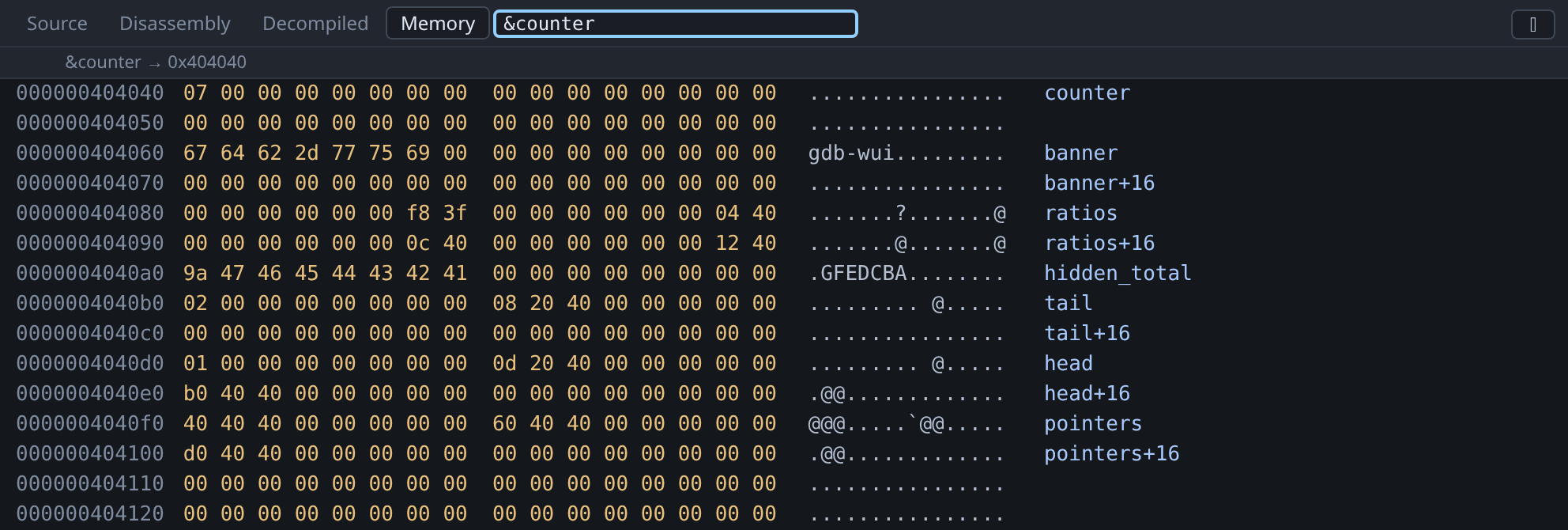
The Memory tab shows sixteen bytes per row: the address, the bytes in hex, their ASCII, and the symbol the row falls in.
The symbol column tells you what you are looking at, so a row reads as banner+16 rather than as an address you have to work out. Symbols are resolved through gdb, so this works with whatever gdb knows — including the ELF symbol table of a stripped binary, which needs no debug info.
Rows that belong to no symbol are left blank. Most of the stack and heap is blank, which is accurate rather than missing.
Naming addresses in a stripped binary
Configure the decompiler and Ghidra’s labels fill the symbol column that gdb has nothing to put in — DAT_001a08de, or whatever you renamed it to. They are shown in the same italics the call stack uses, because Ghidra’s label is a guess and not something the binary says.
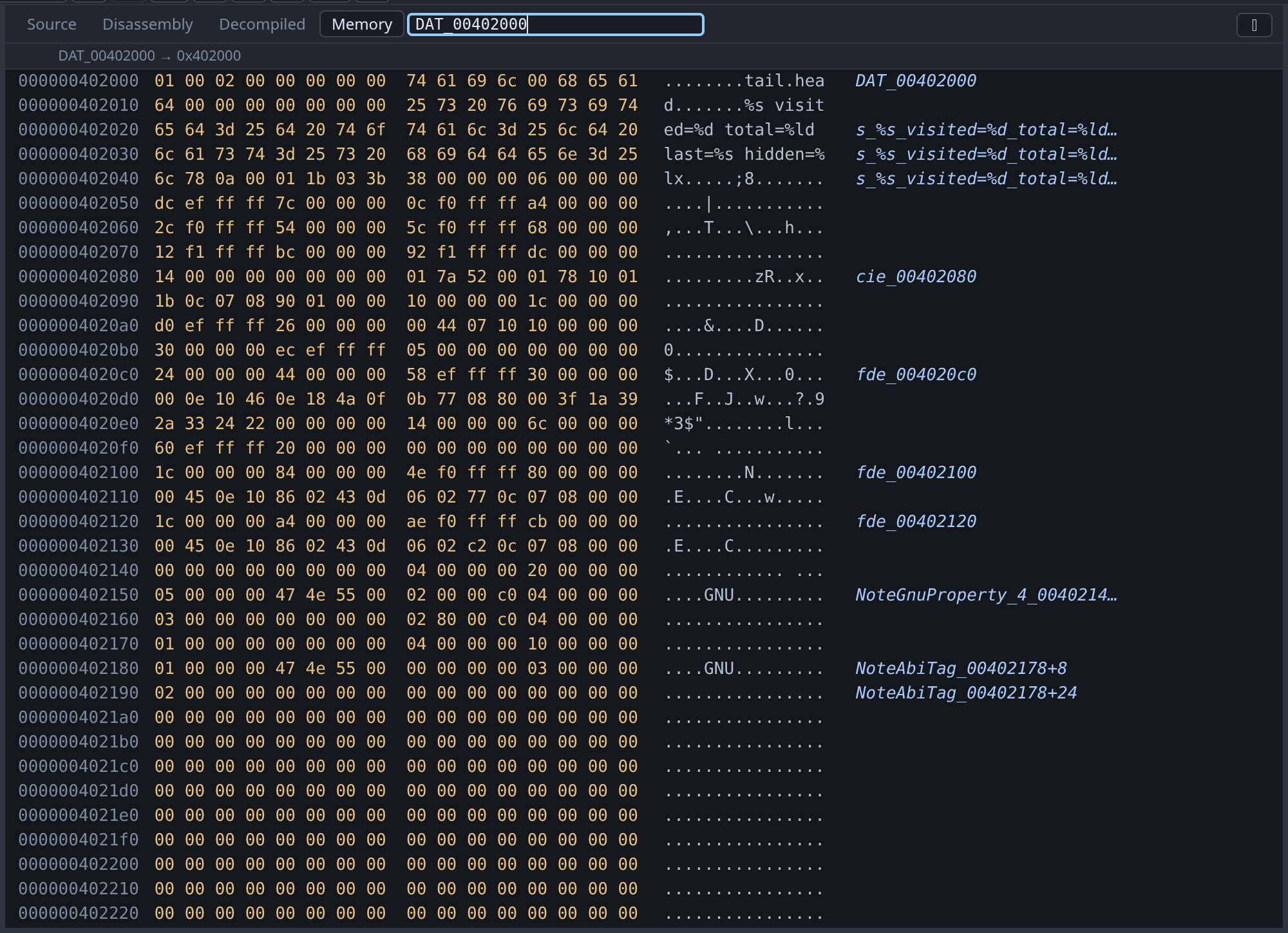
The screenshot shows each case. DAT_00402000 is untyped and names its own row only. The format string a few rows down is typed, so it goes on naming rows through its length. NoteAbiTag_00402178+8 is eight bytes into an object whose extent Ghidra knows, and the row below it is twenty-four. And the rows in between are blank, because nothing is known about them.
A label covers as far as Ghidra knows it runs, and no further:
| The label | The column shows |
|---|---|
| Typed — an array, a pointer, a struct | The name, then name+16 through its length |
| Untyped | The name on its own row, and nothing after it |
That second row is the common case on a fresh import and it is a real limit, not an oversight. Ghidra represents a byte nobody has looked at as one undefined item however far the data actually runs: busybox’s applet_names is a 1954-byte table that reads as a single byte until it is typed. Guessing the extent from the next label along would name the padding between them, and a column reading DAT_00104010+2048 over a run of zeroes is worse than a blank one.
To fix it, right-click the name in the decompiled view and give it a type. char[1954] on that table, and the column names every row of it from then on.
To change a byte, double-click it. See changing values.
Entering an address
The go-to box at the right of the tab strip takes an expression, not only a number: &head, $sp, cfg->items and 0x404040 all work, as does anything else gdb can evaluate to an address. The slot header shows what your expression resolved to, so a mistake is visible. Ctrl+Shift+G puts the cursor in the box.
The box acts on whichever view is focused, so it reads memory when the memory view is the one you are looking at. See jumping to a file, symbol or address.
You can also reach the memory viewer without typing an address: hover a variable, right-click it, and choose Show where it is stored or Show what it points to. Double-clicking a data symbol in the Symbols pane also opens it here.
Unreadable bytes
Bytes in a page that is not mapped are shown as ?? rather than as zeros. Zeros are a value and unmapped memory is not, so showing one as the other would be misleading exactly when you are trying to find out whether a pointer is valid.
Worked example
mkdir -p /tmp/tour && cp testdata/fixtures/globals.c /tmp/tour/
gcc -g -O0 -no-pie -o /tmp/tour/globals /tmp/tour/globals.c
./gdb-wui -project /tmp/tour -exe globals
Break on line 49, run, open Memory and enter &counter. Everything the program declares is in the next few rows, and you can read its data directly:
counteris07.bannerspellsgdb-wuiin the ASCII column.hidden_totalis9a 47 46 45 44 43 42 41: the0x4142434445464748from the source, little-endian, with the low byte already changed becausemainhas run its loop.headat0x4040d0holds01, then a pointer to0x40200d, which is the string"head".
Now enter $sp. The same view appears with the symbol column empty all the way down, because the stack belongs to no symbol.
What the memory viewer does not do
- It does not search for a byte pattern.
- It does not set watchpoints. Use
watchat the console. - It does not overlay structures. It shows bytes; use the Variables pane for a typed view of the same memory.